
What it is
A training record is Trident's note that someone was trained: who, on what, when, the result and when they need a refresher. The Training Register is the list of those records. It is your evidence that the people who handle personal data in your organisation have been told how to look after it.
Each record is one person, or one group recorded by name, completing one piece of training. It can be any kind: a short awareness session you ran yourself, a workshop, a webinar, a seminar, a trainer-led session, an online course or a certification.
In Trident the register is Training Register in the Compliance Hub. How this works, beside the heading, opens About the Training Register. In the Training Hub, Training Progression adds the records up by business unit and by person, so you can see who has been covered and who has not.
When to use it
- After every training session. Record it the same week, with the date it was completed. The date is what makes the record useful as evidence.
- When someone new joins. Train them on how your organisation handles personal data, and record it.
- When a refresher is due. Each record can carry a Refresher due date, and the register counts refreshers due in the next 30 days.
- When someone asks. A client, an auditor or POTRAZ may ask whether your staff are trained. Training Progression shows the coverage across your organisation.
What to gather first
For each session, have to hand:
- What the training was called, for example "Handling personal data at the front desk" or "Annual privacy and security awareness".
- What kind it was: a session you ran, a workshop, a webinar, an online course or a certification.
- Who attended. People with a Trident login can be chosen from a list; anyone else is recorded by name.
- Which business unit each person belongs to.
- When it was completed, and when it should be repeated. A yearly refresher is a common choice for awareness training.
- The result, if there was a test, and the certificate, if there was one.
A short awareness session for the people who handle personal data is a good first entry. Tell them what personal data is, how to look after it and who to tell when something goes wrong.
Steps
-
Open the register. Select Compliance Hub in the left menu, then Training Register. The page shows how many records you have, the pass rate and the refreshers due within 30 days, above the list of records.
-
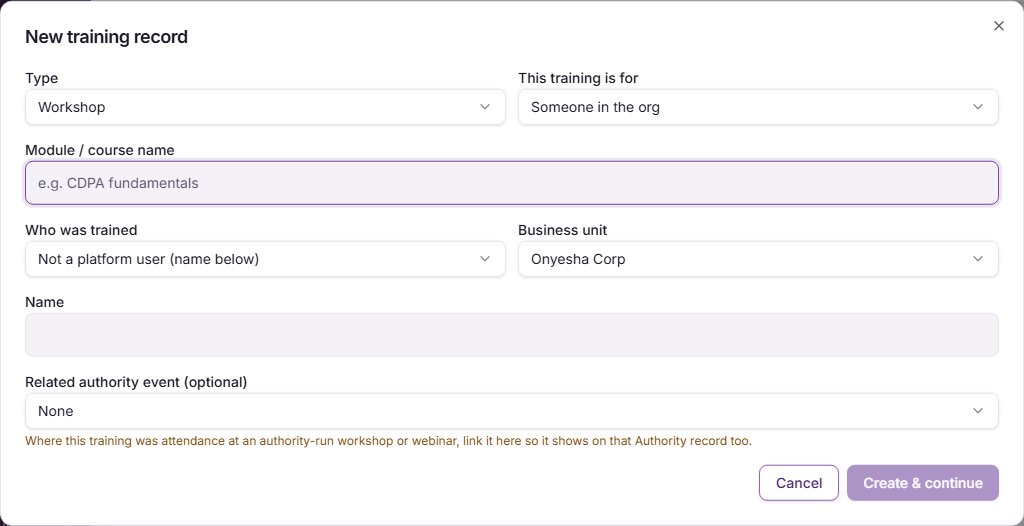
Add a training record. Select New Training. A window called New training record opens. Choose the Type of training, and under This training is for choose Someone in the org or A customer / external person. Type the Module / course name. For staff, choose the person under Who was trained and their Business unit. If they do not have a Trident login, choose Not a platform user (name below) and type their Name. Select Create & continue. Trident saves the record and opens it.
-
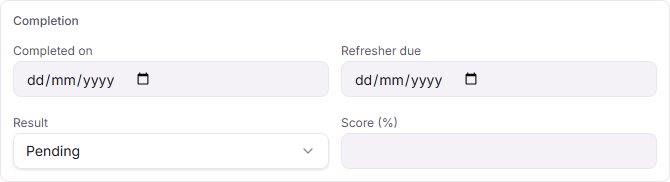
Fill in the completion. On the record, add the Role / title and the Provider (who ran the training) if you know them. In the Completion box, set Completed on, the Refresher due date, the Result (Pending, Passed or Failed) and the Score (%) if there was one. Select Save.
-
Add a certificate if there is one. Fill in Certification status, and attach the certificate under Certificate from your documents. If the training was for your DPO, tick This training relates to the org's Data Protection Officer.
-
Link an authority session. If the training was a workshop or webinar run by the authority, and it is logged in your Authority Contact register, choose it under Related authority event (optional) so the two records point to each other.
-
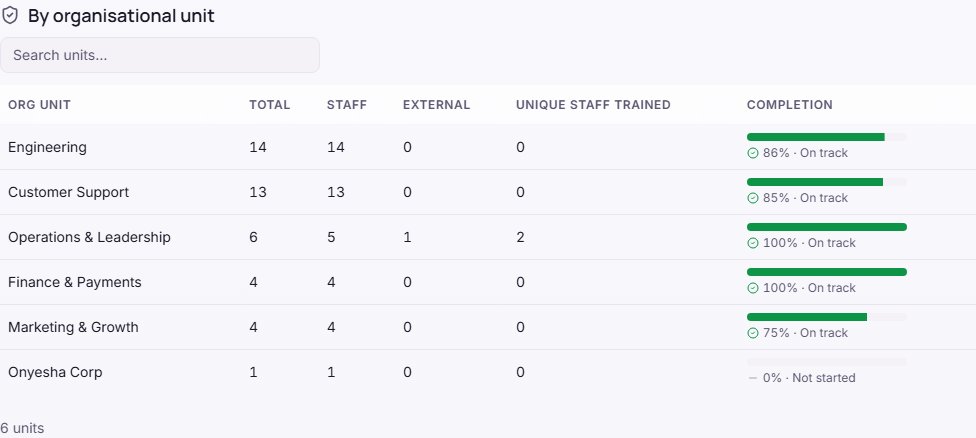
Check the coverage. Select View org-wide training progression on the register, or Training Progression in the Training Hub. It shows, for each business unit, how many records there are and how many have been completed, and then each person's records.
Example entries
| Module / course name | Type | Who was trained | Completion |
|---|---|---|---|
| Annual privacy and security awareness | A session you ran | Each member of staff, one record each | Completed on the session date; refresher due a year later |
| Handling personal data at the front desk | A short session you ran | Front office team, recorded by name | Completed on the session date; refresher due a year later |
| Data protection officer course | Certification | Your DPO, with the DPO box ticked | Passed, with the certificate attached |
| Workshop run by the authority | Workshop | The person who attended | Linked to the authority event |
A record can name a team rather than each person when that is how you train. One record per person gives a clearer picture in Training Progression.
Common mistakes
- Recording training months later. Record it when it happens, with the real completion date. A batch of records entered later is weaker evidence.
- Leaving out the refresher date. Without Refresher due, the register cannot tell you who is due for retraining.
- Training only the office staff. Anyone who handles personal data needs it: reception, drivers who carry customer files, sales staff with customer phone numbers.
- Keeping the attendance sheet only on paper. Record each person in Trident so Training Progression shows the gaps.
- Treating a policy as training. Sending people a policy to read is not a training session. Record the session in which you explained it.
Related modules
- Policies
- DPP and Posture
- Breach and BC/DR
How it links with other modules
- Training Progression. Adds up the Training Register by business unit and by person, in the Training Hub.
- Business units. The units come from your organisation's structure, so coverage lines up with the rest of Trident.
- Authority Contact. A session run by the authority can be linked to its record in the Authority Contact register.
- Privacy Posture. Your Privacy Posture counts training, so recording it keeps your score true to what you have done.
- Breaches. After a breach, retraining the people involved is a common follow-up. The breach guide covers incidents and response plans.
Last checked against Trident on 2026-10-20.