
What it is
A Data Controller licence is issued by POTRAZ. You apply for it on Form DP1. Form DP2 tells POTRAZ who your Data Protection Officer is.
Trident prepares both forms with you, one step at a time, and Assegai files them with POTRAZ for you. Each legal entity in your organisation has its own forms.
In Trident these are two pages in the Assessments Hub:
- Licensing holds Data Controller Licence (Form DP1). It has two sections: Form and Filings.
- DPO holds DPO appointment (Form DP2). It has three sections: Form, Filings and DPOs, where you keep the people who look after data protection for each entity.
When to use it
- When you apply for a licence for the first time. Start Form DP1 on the Licensing page.
- When you name or change your DPO. Record the person in DPOs on the DPO page, then file Form DP2.
- When you already hold a licence. Record its number on the DPP page with Record registration instead of filing a new form.
- When a licence is close to its expiry date. The Licensing page shows Renew your Data Controller licence. Select Renew licence to prepare the renewal.
- When POTRAZ rejects an application. Select Start a new Form DP1. The rejected one stays as it is.
What to gather first
Form DP1 asks for a lot. Have these ready, and complete your other registers first so the form can use them.
- The entity's legal name, registration number, address, phone number and email address.
- Who your DPO is, with their phone number and email address. See DPO.
- The kinds of personal data you hold and where they are kept. Your RoPA is the place to find them.
- Any sensitive data, what you use it for, and the reason you may.
- Who receives the data and where they are, including anyone outside Zimbabwe. Your Relationships Register is the place to find them. See cross-border transfer.
- Your safeguards. The form reads them from your Controls Register.
- The full name of the person who signs for the entity, and a copy of its certificate of incorporation to upload.
- Roughly how many people the entity holds personal data about. This sets the entity's tier and its fees. See data subject.
For Form DP2 you need the entity's contact details and the DPO's contact details and qualifications.
Steps
-
Open the Licensing page. In the left menu, open the Assessments Hub, then select Licensing. If your organisation has more than one legal entity, you see one card per entity, each with its status and a button: Start, Continue, Review and approve or View filing. If it has one, the form opens straight away. Select About this form at any time for a short explanation.
-
Start Form DP1. Select Start the form. Choose how you want to answer. Guided lets you pick from lists for data categories, purposes, recipients and safeguards. Manual lets you write your own answers throughout. You cannot switch once you start, so choose Guided unless you have a reason not to. On a card, Manual form starts the manual way directly.
-
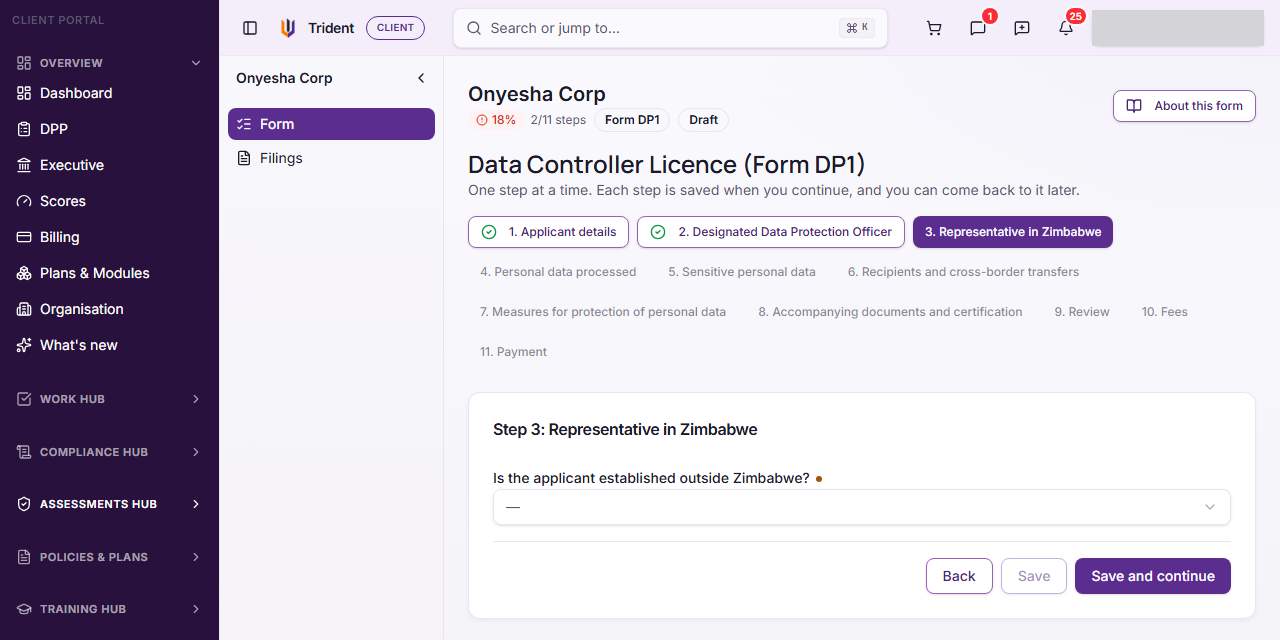
Answer one step at a time. The steps run across the top of Data Controller Licence (Form DP1). Fill in each one and select Save and continue. Each step is saved when you continue, so you can leave and come back. Answers the entity already gave on Form DP2, such as its address and DPO, are filled in for you.
-
Review your answers. After the last question step, Review your answers shows every answer in the order POTRAZ asks for it. To change one, open its step above.
-
See the fees and pay. Fees shows the entity's tier, worked out from how many data subjects it has, the POTRAZ fees with VAT, Assegai's service fee and the total due. The fee covers the licence application and the DPO appointment filing for the entity. Payment lets you add the filing to your cart and pay now or later. If the filing is already paid for, the step after Review is Nothing to pay instead. The pricing page lists the tiers and the current fees. Assegai files the form once it is complete and paid.
-
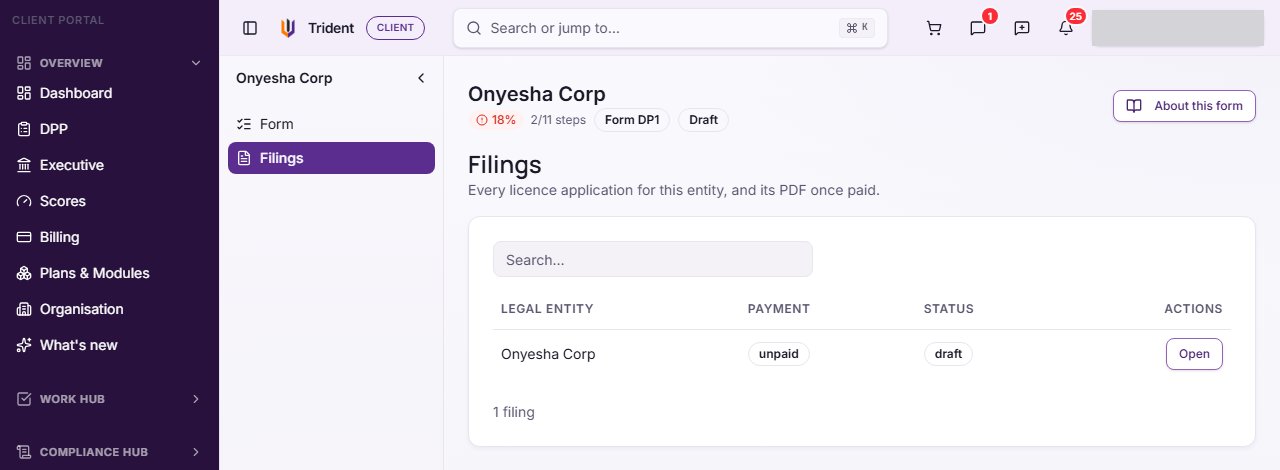
Follow the filing. Open Filings to see every licence application for the entity and its status: Draft, Filed with POTRAZ, Licence issued or Rejected by POTRAZ. Once the application is paid, its PDF is here too.
-
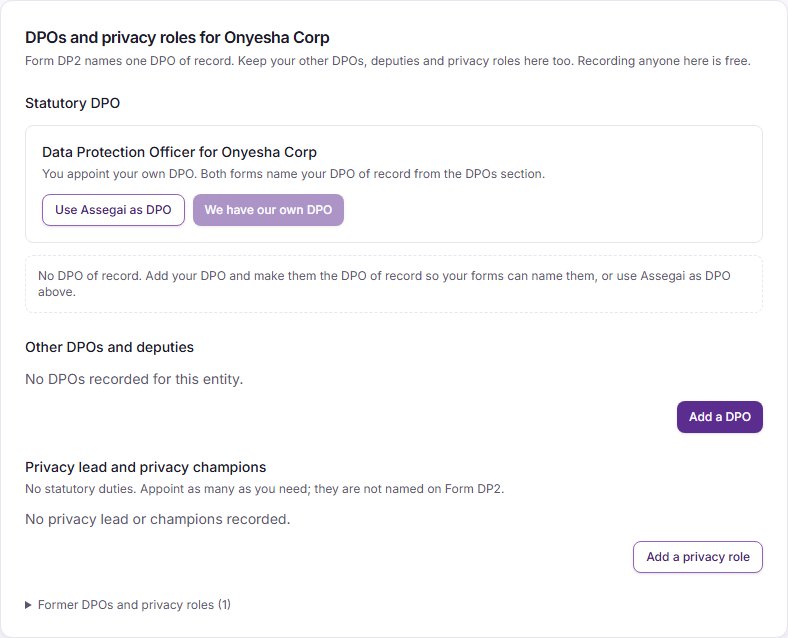
Keep your DPOs on record. On the DPO page, open DPOs. Statutory DPO shows who the forms will name. Select Add a DPO and enter the person's Full name, email, phone, POTRAZ registration number if they have one, and the date in Appointed on. Then select Make DPO of record on that person. Both forms name your DPO of record from this section. Deputies go under Other DPOs and deputies, and anyone who helps without the DPO role goes under Privacy lead and privacy champions with Add a privacy role. Privacy leads and champions are not named on Form DP2.
-
Choose who your DPO is. The DPO card offers We have our own DPO or Use Assegai as DPO. If you choose Assegai, Appoint Assegai as your DPO on the DPO page sets out the DPO Appointment Service. Assegai becomes your DPO only once you have ordered and paid for the service and Assegai has confirmed the Named DPO.
-
File Form DP2. Open Form on the DPO page. It works like Form DP1: one step at a time, then Review your answers, then the steps that apply to this filing. If the entity's Form DP1 is paid, Form DP2 shows Nothing to pay. When Assegai prepares your Form DP2 under the DPO Appointment Service, Trident shows Waiting for your approval. Check every answer and select Approve, and Assegai files it.
-
When the DPO changes. A filed Form DP2 keeps the DPO it was filed with. Record the new person in DPOs, make them the DPO of record, and select Start a new Form DP2. When Assegai is your DPO, the DPO Appointment Service prepares the new form instead. The earlier filing stays as it is.
Example entries
| Field | Example for a small school |
|---|---|
| Entity name | Hillside Primary School (Private) Limited |
| Nature of entity | Private |
| Personal data processed | Pupils' names, dates of birth and school reports; parents' contact details; staff payroll records |
| Sensitive data | Pupils' health and allergy notes, used to keep them safe at school |
| Recipients | The payroll bureau, the school's email provider, the medical aid society |
| DPO of record | Rudo Moyo, the bursar, with her phone number and email |
| Privacy champion | The deputy head, who handles parents' questions about their data |
Common mistakes
- Starting the form for a branch. Forms are filed for legal entities only. If no entity shows, add one under Onboarding, Organisation structure first.
- Skipping the Controls Register. The safeguards step reads your Controls Register. Fill it in first, or the step stays open.
- Choosing Manual by accident. You cannot switch once you start. Choose Guided unless you want to write every answer yourself.
- Naming a privacy champion as the DPO. Only the DPO of record is named on the forms. A privacy lead or champion is not.
- Expecting Use Assegai as DPO to finish the job. It records your choice. Assegai is your DPO only after you order the DPO Appointment Service on the DPO page and it is confirmed.
- Filing again when you already hold a licence. Record the licence on the DPP page with Record registration. It then shows as Existing licence recorded.
- Leaving a DPO change unrecorded. Update DPOs first, so the new Form DP2 names the right person.
Related modules
How it links with other modules
- RoPA. The personal data, purposes and sensitive data you list on Form DP1 should match your RoPA activities.
- Relationships Register. The recipients on Form DP1 should match the vendors and processors in your Relationships Register.
- Controls Register. Form DP1 reads your safeguards from it.
- Organisation. Your legal entities come from the organisation structure, and your DPO shows on the Organisation page under Consultant & DPO.
- DPP. Licensing and your DPO are jobs on your Data Protection Plan, where you also record a licence you already hold.
- Billing. Fees and the DPO Appointment Service go through your cart and Billing.
Last checked against Trident on 2026-10-23.