
Module guide for client admins and client users
What it is
A cross-border transfer is any time personal data leaves Zimbabwe: a cloud service hosted abroad, a supplier or a group company in another country, someone abroad with remote access, or backups kept outside the country.
A transfer impact assessment, or TIA, is your written record of one such transfer: what moves, to whom and where, which route in the law you rely on, how risky the destination and the recipient are, and what protects the data. Trident's own words for it, in About this assessment, are "the documented judgment that a specific transfer of personal data outside Zimbabwe is lawful and adequately protected".
In Trident this is Cross-Border Transfers, in the Compliance Hub, with two tabs:
- Transfer register lists every transfer you have assessed and where each stands.
- Assessments lists the assessments themselves, and is where you start a new one. The Assessments Hub links here as Cross-Border Assessments.
Select How this works on the page to open About Cross-Border Transfers.

When to use it
- Before you start sending data abroad, for a new cloud tool, supplier or partner.
- For a transfer already happening, to put it on record.
- When something about a transfer changes: a new destination, a new kind of data, or a new contract.
- When Trident suggests one. A gap analysis, a DPIA or a RoPA activity can point you to a TIA.
- When a review falls due. Each finished assessment carries a next review date.
What to gather first
- The recipient: its legal name, its country, and the vendor's entry in your Relationships Register if it has one.
- What data goes, whose it is, and whether any of it is sensitive data.
- How it moves: a one-off copy, a regular sync, or remote access.
- The contract or DPA with the recipient, in your files.
- What you know about the recipient's security, certifications and any breaches.
- Who will sign: your DPO of record and an authorised representative of your organisation.
Steps
The step-by-step guide has every button. In short, an assessment has seven steps:
- Transfer mapping: what moves, to whom, where and how.
- Legal basis: the route in the law the transfer relies on, and whether POTRAZ has been notified.
- Risk assessment: the destination country's protections, with the sources you relied on.
- Safeguards: the recipient's security, the contract and what the people affected are told.
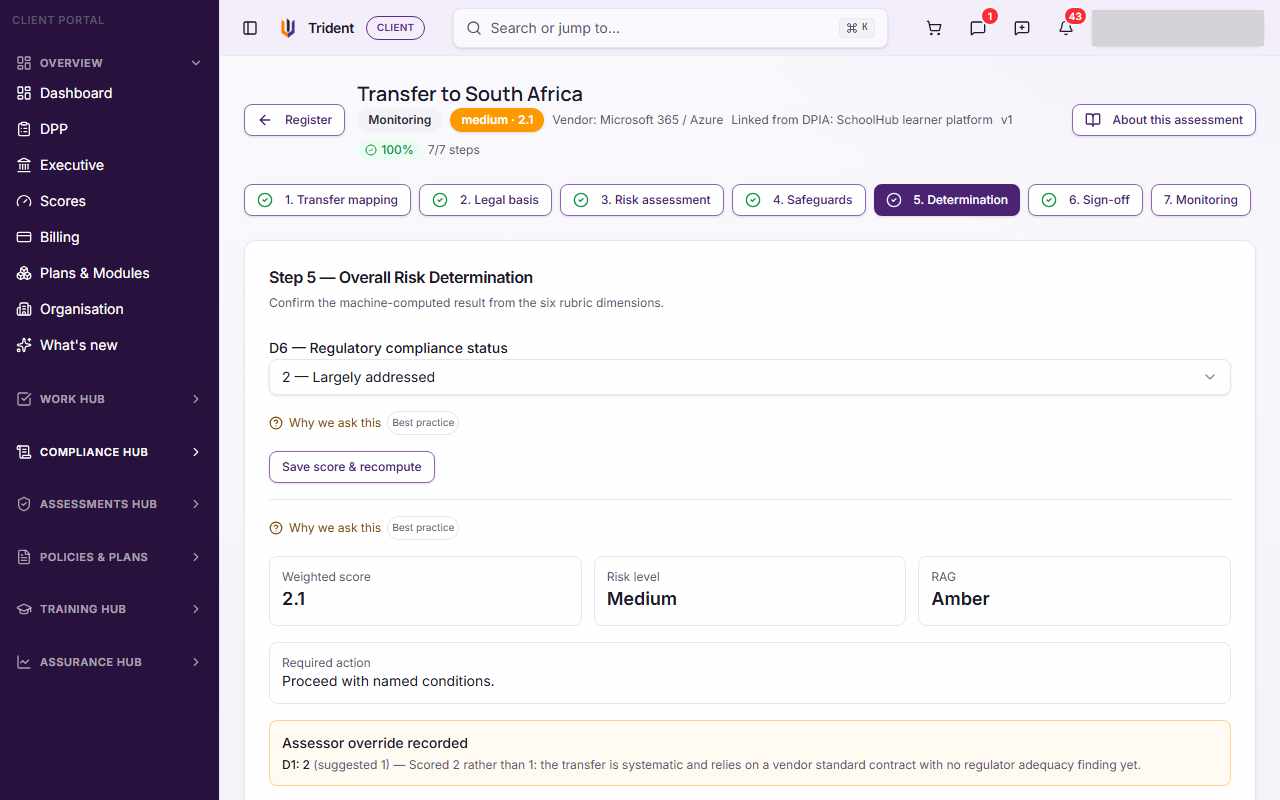
- Determination: Trident's result from your answers.
- Sign-off: two different people sign.
- Monitoring: how often to review it; this step finishes the assessment.
How the result is reached. Your answers are scored on six dimensions. Trident suggests a score for some of them from your answers, and you may choose another with a reason. The Determination step then shows the Weighted score, the Risk level (low, medium, high or critical), a colour rating from green to red, and the Required action that goes with the risk level, in the product's words. In About this assessment, Trident says missing evidence "scores as high risk, not neutral", and that the tool "does not replace the DPO's judgment, and it is not legal advice".
Example entries
| Field | Example for a small accounting firm |
|---|---|
| Why is this assessment being run? | Routine: the firm is moving its email to a cloud service |
| Destination | South Africa |
| Recipient | The email provider, from the Relationships Register |
| What personal data is transferred | Client names, contact details, tax numbers in attachments |
| Transfer method | Ongoing sync |
| Safeguards | Signed DPA on file; the provider's security certificate linked as evidence |
Common mistakes
- Assessing a vendor instead of a transfer. One assessment covers one flow of data to one recipient and destination. A vendor with two destinations needs two.
- Guessing. Where you do not know a fact, say so. Missing evidence counts as high risk, so an honest "unknown" is better than a hopeful "yes".
- Leaving the DPA out. Link the signed agreement in Safeguards; Trident also links it to the vendor in your Relationships Register.
- One person signing twice. Sign-off needs two different people. Who may sign is set in your Organisation's Sign-off policy.
- Finishing and forgetting. A high or critical result asks you to act before the transfer goes ahead. Use Run follow-up assessment once you have put new safeguards in place.
Related modules
How it links with other modules
- Relationships Register. Pick the recipient from it when you start, and a linked DPA is recorded on the vendor too. After you finish, Register suggestions can propose updates to it.
- RoPA and the Risk Register. Register suggestions can also propose changes to a RoPA activity and new risks. Nothing is written until you accept it.
- DPIA. An assessment can be linked to a DPIA that covers the same transfer.
- Gap Analysis. Its cross-border items can point you here.
- Tasks. A planned POTRAZ notification date in Legal basis becomes a task.
Last checked against Trident on 2026-10-28.