
Step-by-step guide for client admins
Before you start
- Who can do it. A client admin, with the AI Blueprint module in the plan. Without it, the page shows an upgrade message.
- What it costs to try. Generate draft uses one Blueprint unit from your plan. Draft with AI uses AI credits and sends your information to an AI provider; the screen has a note that says what is sent. Prices are on the pricing page.
- What to have. Your Data Assets register filled in, because the draft is composed from it.
Steps
-
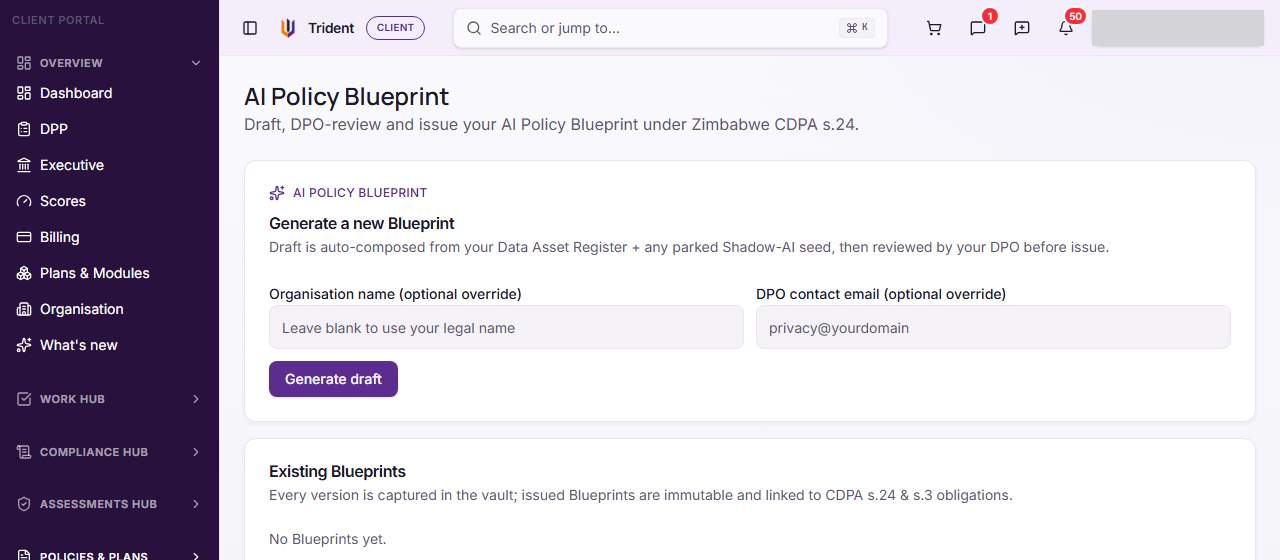
Open AI Blueprint. In the left menu, open Policies & Plans and select AI Blueprint. Existing Blueprints lists any you have, with their status.
-
Generate a draft. In Generate a new Blueprint, add an organisation name or a DPO contact email only if you want to override the defaults, then select Generate draft. Trident composes the draft from your data assets, uses one unit, and opens the Blueprint's workspace.
-
Edit the draft. On the Draft tab, change the text, then select Save draft. Draft with AI rewrites the narrative sections from your data classifications; use it only if you accept the cost and the AI provider note.
-
Classify your data assets. On the Classification tab, each asset has a choice such as restricted or not OK for AI. Marking an asset OK for AI asks you for a reason.
-
Send it for review. Select Submit for DPO review. The status moves to in review.
-
Review and issue. On the Review & Issue tab, a DPO or consultant records a Reviewer note (DPO only) and selects Approve, or sends it back to draft. Only a platform admin or a consultant on your account can approve or reject. After approval, Issue final (immutable) creates the final version. It cannot be changed afterwards.
Check it worked
- The draft shows in Existing Blueprints with its status.
- After issue, the status shows final, and the final version is in your files.
If something goes wrong
- Approve says only a platform admin or consultant DPO can review. The review step belongs to your consultant or Assegai. Ask them.
- Issue final is greyed out. It becomes available after approval.
- Generate draft is refused. Your plan may not have a Blueprint unit left. Check Billing.
Last checked against Trident on 2026-11-06.